The retainership board — from first visit to fully integrated
Every first-timer and new convert lands on this board automatically. Learn which columns move on their own, which moves are yours to make, and what triggers each step of the journey.
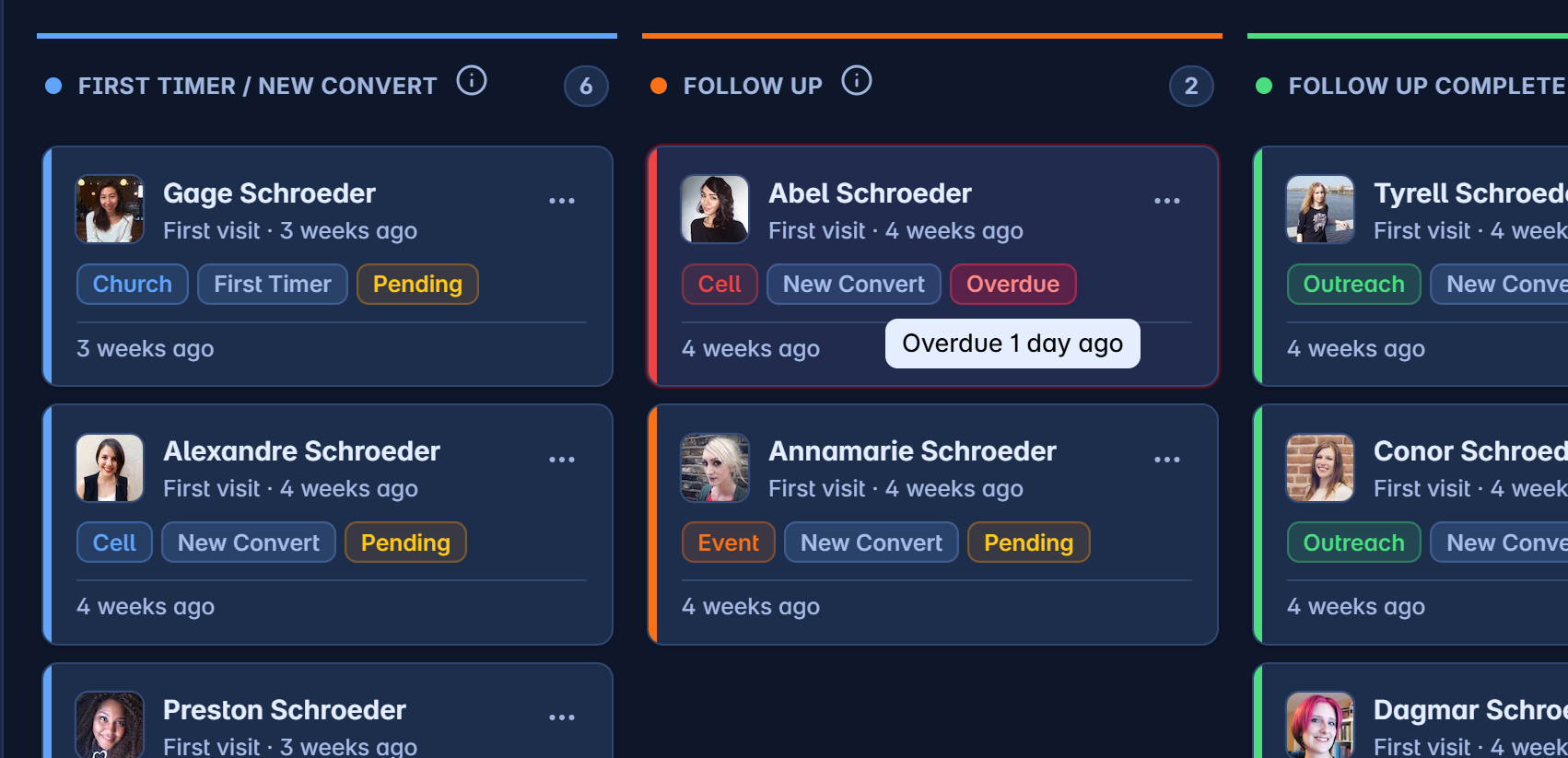
Someone visits your church for the first time. Four weeks later, has anyone actually called them? The retainership board answers that question at a glance — it tracks every first-timer and new convert through seven stages, from First Timer all the way to Integrated, and flags anyone who’s stalling.
The board mostly runs itself. People appear on it automatically, and most stage changes happen on their own as your church simply does what it already does — records a follow-up, adds someone to a cell, takes attendance. Your team makes exactly three moves. This guide covers which is which.
Watch one journey, end to end
Here’s the whole story in motion — a new convert lands on the board automatically, gets assigned for follow-up, joins a cell, and reaches Integrated:
Find the board under People → Retainership. Pick a church (required), set the period, and use the toggles to show inactive people or filter to first-timers / new converts only.
The seven stages — and who moves the card
| Stage | What it means | How a card gets here |
|---|---|---|
| First Timer / New Convert | Visited for the first time, or recently gave their life to Christ | Automatic — the moment a person is captured with that connection status |
| Follow Up | A leader owns the follow-up and contact is in progress | You / Automatic — drag the card to assign a follow-up, or it moves on its own when a follow-up is created anywhere in the system |
| Follow Up Complete | They’ve been contacted and the outcome is recorded | You / Automatic — drag the card to complete the follow-up, or it moves on its own when the follow-up is actioned in the system |
| Returning | They confirmed they came back after their first visit | Automatic — set by the follow-up outcome |
| Cell Assigned | Placed in a cell group, but hasn’t attended yet | You / Automatic — drag the card and pick a group, or it moves on its own when they’re added to a cell anywhere |
| In Cell | Actively attending a cell group | Automatic — their cell leader marks attendance |
| Integrated | Attending services and a cell consistently | Automatic — after 3 confirmed cell attendances |
Cards only move forward. The board never moves anyone backwards — progress can’t be accidentally undone by a stray drag or a duplicate event.
The three moves your team makes
Only three drags are allowed, and each opens a short dialog so the move carries real information — not just a card changing columns.
1. First Timer → Follow Up
Drag a new person onto Follow Up to start their follow-up. You’ll capture the type (General, New Convert, Home Visitation, or Death), how urgent it is, who’s assigned, and a note. From this moment the follow-up has an owner — and if it goes quiet, the card turns red.
2. Follow Up → Follow Up Complete
Once contact is made, drag the card to Follow Up Complete and record the outcome: the action date and a note are required, and two checkboxes matter —
- They returned — tick this and the card automatically advances again to Returning. You don’t drag it there.
- Needs another follow-up — tick this to raise a fresh follow-up without losing the history.
3. Follow Up Complete or Returning → Cell Assigned
The goal of every follow-up is connection. Drag the card to Cell Assigned and pick their cell group — the person is added to that group as a member right there. If a leader has already added them to a cell elsewhere in the system, the card moves by itself and you’ll find it already done.
Any other drag is quietly rejected — you can’t drop someone into Returning, In Cell, or Integrated by hand. Those columns are earned, not dragged. (Re-ordering cards within a column is allowed, but the order isn’t saved between visits.)
What moves on its own — and what triggers it
This is the Unity System™ at work: the board listens to the rest of ChurchManager, so ordinary ministry activity moves cards without anyone touching the board.
| When this happens anywhere in the system… | …the board reacts |
|---|---|
| A person is added with connection status First Timer or New Convert | A card appears in the first column |
| A follow-up is created for someone | Their card moves to Follow Up — and if they had no card yet, one is created there |
| A follow-up is actioned | The card moves to Follow Up Complete; if the outcome says they returned, it continues to Returning |
| They’re added to a cell group | The card moves to Cell Assigned and remembers which cell |
| Their cell leader marks them present at a cell meeting | The card moves to In Cell (their very first visit doesn’t advance the card — it just logs activity) |
| They reach 3 confirmed cell attendances | The card moves to Integrated — journey complete |
Two details worth knowing:
- Only cell groups count. Attendance in other group types (ministry teams, service groups) doesn’t advance the board.
- Attendance wakes people up. Recording cell attendance also clears a person’s inactive state, so returning drifters come off the inactive list automatically.
Reading a card
Each card shows the person, when they first visited, their tags, and their last activity. The states to watch:
- Red ring + Overdue tag — the scheduled next action date has passed. This card needs someone today.
- Pending — a follow-up exists but hasn’t been actioned yet.
- Inactive — no recent activity; hidden by default until you flip the Inactive toggle.
Columns show 5 cards by default — click Show more to expand. Use the card’s menu to remove someone from the board entirely (this doesn’t delete the person, only their board card).
The Monday-morning routine: open the board, scan for red. Every overdue card is a person one decision away from drifting. Action those first — everything else on this board can wait a day; a forgotten first-timer can’t.
What you’re really looking at
The columns on the right — In Cell, Integrated — fill up without anyone dragging anything. That’s the point. Your team’s job is the messy human middle: make the call, record the outcome, find them a cell. The system’s job is to never let anyone slip out of view while you do it.